1. The Problem with Open-Amount QR Codes in Business
Standard static payment QR codes found on street counters are open-ended: they encode only the merchant's Virtual Payment Address (VPA). When a customer scans the code, their mobile screen displays an empty input box where they must manually type the payment figure.
While this flexibility is necessary for general grocery checkouts with varying basket totals, it introduces critical business bottlenecks in many commercial workflows:
- Manual Typing Mistakes: Customers in a rush frequently misplace digits (e.g. entering ₹380 instead of ₹830, or ₹500 instead of ₹5000), causing uncomfortable disputes at the cash counter.
- Checkout Delays: Asking every customer to type the amount, double-check it, and show their screen creates slow queue bottlenecks during rush hours.
- Bookkeeping & Reconciliation Headaches: When clients pay freelance invoices with arbitrary split amounts or typos, matching bank statement lines to accounting ledgers becomes tedious.
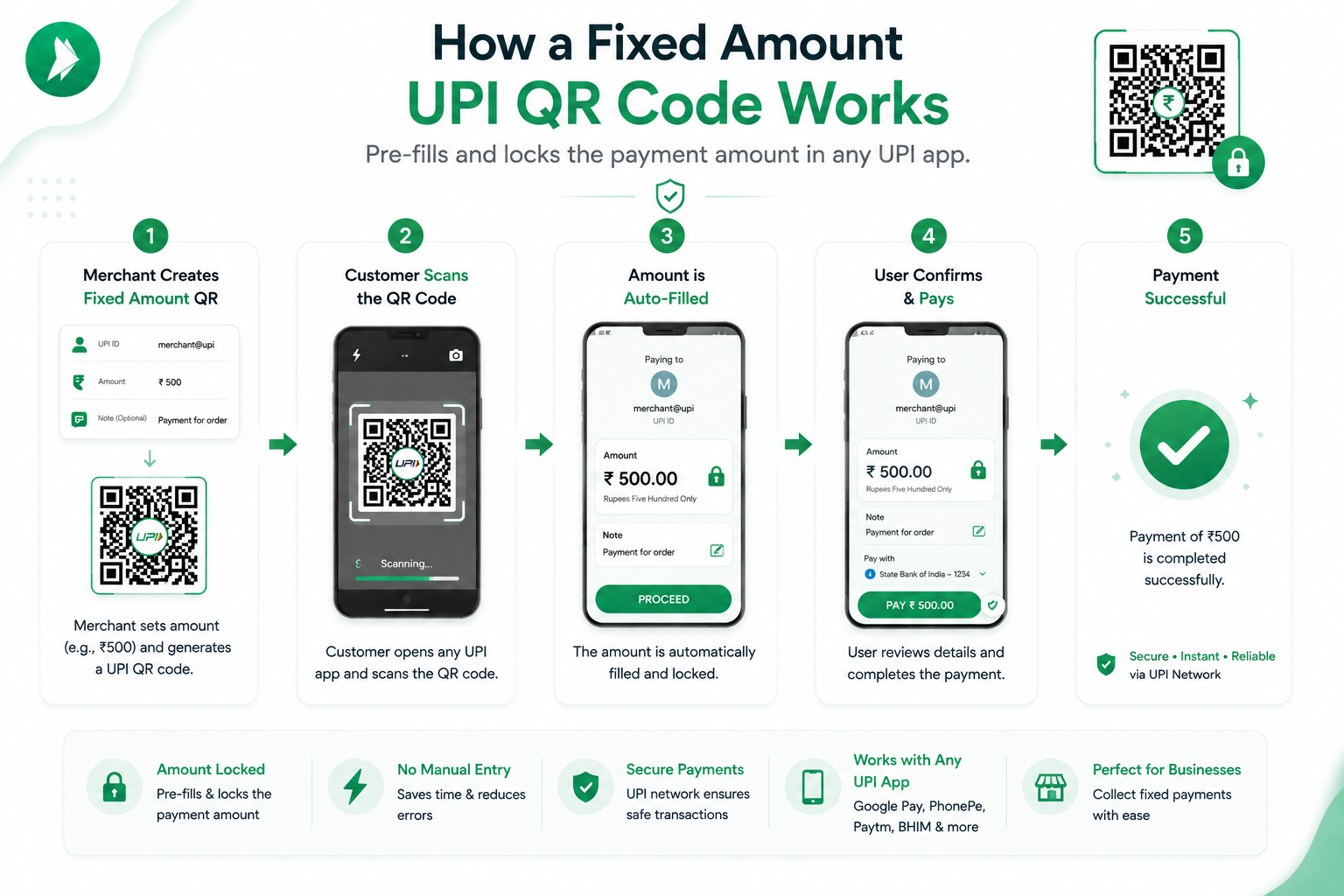
By using a UPI QR code generator with amount, you eliminate these errors by locking the exact rupee sum directly into the QR image matrix.
2. How the NPCI URI Amount Parameter (am=) Operates
The National Payments Corporation of India (NPCI) defines an open specification for UPI payment intent URIs (upi://pay). When compiling an amount-specific code, the generator appends two specific parameters to the string:
am=: The exact numerical amount in Indian Rupees, formatted with up to two decimal places (e.g.am=499.00oram=1250.50).tn=: The transaction note or memo (e.g.tn=Invoice402ortn=DentistryFee), which gets recorded in both payer and payee bank statements.
Here is what the raw URI deep link looks like under the hood:
When a customer’s phone camera or UPI scanning module reads this URI, the operating system routes the request to their active UPI application, which instantly parses the parameters and pre-fills both the payee name and the exact figure of ₹1,499.00.
3. How Google Pay, PhonePe, and Paytm Handle Fixed Amounts
How do different payment apps treat embedded amounts? Because they all adhere to NPCI compliance standards, their behavior is remarkably consistent:
- Google Pay: Displays the pre-filled amount prominently in bold text. The input field is locked in read-only mode. The customer cannot change the digits and is guided directly to select their debit bank account and enter their UPI PIN.
- PhonePe: Populates the transfer amount automatically and prevents keyboard editing on standard consumer scanning flows.
- Paytm: Opens the payment sheet with the amount and transaction remark pre-populated, bypassing the amount entry step entirely.
- BHIM App: Adheres strictly to NPCI guidelines, displaying the exact pre-filled rupee amount with the embedded transaction note.
4. 5 Essential Real-World Use Cases for Fixed Amount QR Codes
Embedding fixed amounts into payment QR codes is transforming efficiency across diverse Indian industries:
1. Freelancer & Small Agency Invoice PDFs
Rather than sending bank account numbers, IFSC codes, and SWIFT details—which require clients to add a beneficiary and wait 30 minutes for activation—freelance designers, writers, and consultants can generate a unique fixed-amount QR code for each invoice (e.g. ₹15,000 for Invoice #88) and paste it into their PDF footer. Clients simply scan the PDF screen and pay in 5 seconds.
2. Restaurants with Fixed-Price Thali & Buffet Menus
Fast-casual eateries, chaat stalls, and South Indian tiffin centers offering fixed-price combos (e.g. Special Thali at ₹120 or Breakfast Combo at ₹60) can place dedicated QR standees next to each item. Customers order, scan the exact dish QR, and show the instant confirmation screen.
3. Residential Society Maintenance & Club Dues
Apartment resident welfare associations (RWAs) often collect standardized monthly maintenance fees (e.g. ₹2,500/month). By circulating a fixed-amount QR code with the note Maintenance Dues, treasurers ensure exact amounts are paid and easily trackable in bank passbooks.
4. Event Entry, Sports Tournaments & College Fests
Organizers of marathons, cricket tournaments, or tech conferences can print fixed-price registration QR cards (e.g. ₹350 Entry Fee) at ticket counters, speeding up spectator entry lines.
5. Clinics, Diagnostic Labs & Tutors
Private doctors, dentists, diagnostic centers, and coaching centers with standardized consultation charges (e.g. ₹500 OPD Fee or ₹1,000 Monthly Tuition) eliminate cash-handling friction at the reception desk.
Generate a Fixed Amount UPI QR Code in Seconds
100% free client-side tool with instant PNG, SVG, and A4 printable standee downloads.
⚡ Create Fixed Amount QR Code5. Step-by-Step Tutorial: Generating a Fixed Amount QR Code
Creating your fixed amount payment QR code on our platform takes less than 30 seconds:
- Navigate to the generator on our homepage.
- Input your Payee UPI ID (e.g.
9876543210@paytmorclinic@okhdfcbank). - Enter your registered Payee Name (e.g. Dr. Roy Dental Clinic).
- Toggle the "Specify Fixed Amount" switch to ON.
- Enter your desired amount in INR (e.g.
500.00) or click one of the quick preset pill buttons (₹50, ₹100, ₹250, ₹500, ₹1000). - In the Transaction Note box, add a clear memo like Consultation Fee or Invoice 104.
- Download your high-res PNG or scalable vector SVG file.
6. How to Embed Fixed QR Codes in PDF Invoices & Receipts
To integrate your fixed-amount QR code into accounting software and invoice templates:
- Microsoft Word / Google Docs: Insert the downloaded PNG image into the bottom right corner of your invoice template alongside a callout saying "Scan with any UPI app to pay ₹X instantly".
- Canva & Graphic Tools: Upload the vector SVG file for razor-sharp rendering on print-ready billing stationary.
- Accounting Software (Zoho Books, Tally, Vyapar): Upload the QR image file as a custom attachment block on standard invoice layout designs.
7. Transaction Limits, Security & Best Practices
When utilizing fixed amount QR codes, keep these essential technical guidelines in mind:
- NPCI Daily Limits: Standard peer-to-peer (P2P) UPI transactions have a maximum daily cap of ₹1,00,000 (1 Lakh INR). If billing large corporate invoices above ₹1 Lakh, transactions should be broken into tranches or settled via IMPS/NEFT net banking.
- Verify Payee Details Before Distributing: Always test-scan your generated QR code on a mobile device and verify that the pre-filled amount and recipient name match your expectations exactly before mass-mailing invoices.
8. Frequently Asked Questions
Can a customer edit or decrease the amount when scanning a fixed amount QR?
In certified NPCI apps like Google Pay, PhonePe, Paytm, and BHIM, the amount passed in the am parameter is pre-filled and locked in read-only mode to prevent underpayment or manual alterations.
How does the fixed amount parameter look in the raw UPI URI string?
It is encoded as am=500.00 (two decimal format) alongside pa (payee address), pn (payee name), and cu=INR.
Can I embed fixed amount QR codes directly into PDF invoices?
Yes. You can export a high-res 300 DPI PNG and paste it directly into MS Word, Canva, QuickBooks, Zoho Books, or custom PDF invoice templates.
Is there any extra charge or commission for using fixed amount UPI QR codes?
No. Fixed amount QR codes use standard client-side NPCI deep links with zero transaction commission and zero monthly subscription costs.